WORKFLOW
Less setup. More clarity.
SKUVis is built for sellers who already have product photos and accurate claims—not for inventing specs or writing long prompts.
结论:Pick a store profile or tool, upload media you may use, review quotes and layouts, then download results—credits apply only when you confirm a quoted AI run, and failed jobs release holds when billing rules apply.
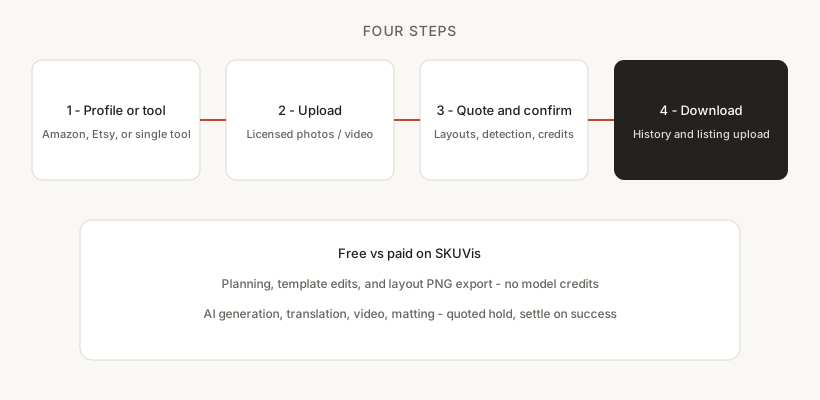
Four steps
The path from photo to publish-ready file stays consistent whether you use product images or a single-purpose tool.
- Choose your destination store profile or open a single-purpose tool from the toolkit.
- Upload images or video you have rights to use; size limits are checked before provider calls.
- Review quotes, layouts, or detection results before spending credits.
- Download outputs from History; failed or canceled runs release held credits when billing rules apply.
Each step has explicit validation so provider-bound failures happen before credits are held when possible.
When credits are used
Planning, template edits, and layout PNG export stay free; confirmed AI runs reserve credits until success or release on failure.
AI generation, translation, video, matting, try-on, and similar tools show a quote before you confirm. Product-benefits PNG export never calls the model.
Your files
Uploads and results stay private to your account on SKUVis; retention follows site policy unless your deployment changes limits.
Typically on the order of weeks. You can delete projects you own from the workspace.
Where to go next
Open the tools hub for per-tool guides with pixel limits, FAQs, and direct workspace links.
Each of the twelve capabilities has its own English guide at /tools/[tool-id].
Inputs & outputs
What you provide
- Account on skuvis.com
- Licensed product media
- Confirmed product facts
What you get
- Downloadable images and videos
- Run history with credit status
Common use cases
- First-time setup for a product image set
- Running a one-off background removal before listing
- Translating packaging text for a new locale
FAQ
Do I need prompt engineering skills?
No for platform plans—you edit roles and headlines in structured fields. Individual tools may offer optional parameters but start from uploads, not blank prompts.
Can I mix tools on one product?
Yes—many sellers mat or erase on masters, then run product images or translation. Each tool quotes separately.
Where do I see if a run failed?
History shows status and whether credits were charged when release rules apply.