APPAREL · IMAGE TOOL
Virtual try-on for ecommerce apparel
Turn flat-lay or mannequin shots into on-model visuals without reshooting—ideal for lookbooks, PDP galleries, and marketplace listings when you already have a trusted model reference.
At a glance: Upload one model photo and one garment photo; SKUVis sends them through an async virtual try-on job and returns a new image where the clothing on the model is replaced while pose and overall scene stay consistent. You choose 1K or 2K output, see a credit quote before confirming, and download the result from history—failed runs release held credits when billing rules apply.
What virtual try-on does
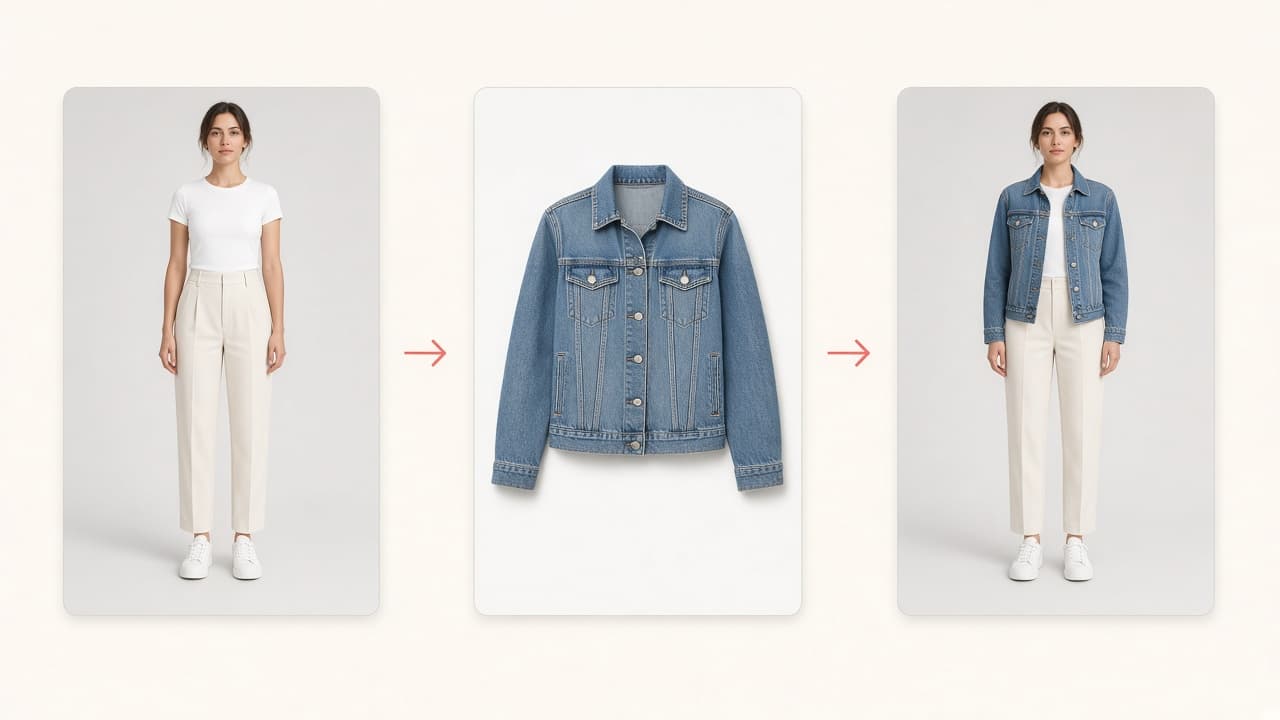
Virtual try-on swaps the garment visible on your model photo while keeping pose and scene stable—it does not replace your entire photoshoot pipeline.
The model keeps posture, framing, and facial detail from your reference photo while the clothing image you provide replaces the outfit on the body. SKUVis wraps the Alibaba Cloud Aidge VirtualTryOn (2026-04-28) async API: you upload assets in the workspace, we publish secure URLs, poll the task, and attach credits to each run.
How it works in SKUVis
You choose one model source, one garment image, and a 1K or 2K preset, confirm the credit quote, then download the finished image from History when the async job completes.
- Select a model from the SKUVis catalog, your personal library, or upload a one-time model photo.
- Upload one garment image and optionally set garment type (top, bottom, dress, shoes, hat, or auto-detect).
- Choose 1K or 2K output and review the credit quote.
- Submit the job and download the result from History when status is ready.
Runs are asynchronous—leave the page and return via History if processing takes longer than a minute.
Image requirements (enforced before the API call)
Each upload must be JPG, JPEG, PNG, BMP, or WebP, between 256×256 and 2049×2049 pixels, and 10 MB or smaller—or SKUVis rejects it before quoting.
These limits mirror Aidge VirtualTryOn input rules. SKUVis shows your actual width, height, and file size when a file fails validation.
- Model and garment must be two different files
- Public HTTPS URLs are handled by SKUVis when calling the provider—you do not paste URLs manually
What it is not
Virtual try-on is not body measurement, size advice, or proof of marketplace compliance.
Results vary with photo quality, occlusion, and garment type. You must have commercial rights to every model and garment image; SKUVis does not perform copyright or likeness clearance.
Inputs & outputs
What you provide
- One model image (catalog, personal, or upload)
- One garment / cloth image
- Optional garment category for better placement
- Resolution preset: 1K or 2K
What you get
- One on-model try-on image (download from run history)
- Async task status until complete or failed
Formats: Result delivered as a downloadable image asset in your account
- 256×256 minimum, 2049 px maximum on each edge
- 10 MB max per upload
- Quoted credits: 4 (1K) or 5 (2K) on current SKUVis presets—confirm in app before run
Common use cases
- Show a new colorway on the same house model for Shopify PDP
- Create on-model thumbnails for Amazon apparel without a studio day
- Preview how a supplier flat-lay reads on your brand model
- Produce social creatives that match your existing campaign model
FAQ
Does virtual try-on change the model’s face or pose?
The service is designed to keep the model’s pose and overall scene while replacing the garment. Extreme angles, heavy occlusion, or low-quality inputs may still produce imperfect fits—always review before publishing.
What is the best image size for virtual try-on?
Use clear photos within 256×256 to 2049×2049 pixels and under 10 MB. SKUVis blocks out-of-range uploads early and shows your actual dimensions in the error message.
Should I set garment type (tops, dress, shoes)?
Optional. Choosing tops, bottoms, dresses, tops_and_bottoms, shoes, or hats can help when auto-detect is wrong; leave auto when your photo is a standard flat product shot.
What is the difference between 1K and 2K try-on?
Both complete the same workflow; 2K requests a higher output resolution preset and uses more credits on SKUVis. Pick 1K for drafts and 2K when you need sharper exports.
How long does try-on take?
Runs are asynchronous (queue + processing). SKUVis polls the provider and updates History—timing depends on provider load, not a fixed SLA.
If try-on fails, do I lose credits?
Failed or canceled runs show as not charged in History when release rules apply; you only settle credits on successful completion.
Can I use any model photo from Google?
No—you must have rights to both model and garment images. SKUVis does not perform copyright clearance.